Launch Your Paid VS Code Theme: From Design to $3K MRR in 30 Days
Launch a premium VS Code theme in 30 days using a validation-first system that minimizes wasted effort and maximizes early revenue. You'll go from market research to a production-ready, accessible theme, then publish with a freemium-to-paid funnel, license delivery, and a targeted launch plan designed to reach your first 200-500 customers at $9-$29 per license.

You've abandoned three SaaS projects because they took too long and you had no idea if anyone would actually pay for them. VS Code themes are different: 50 million developers use them daily, you can ship one in a weekend, and the top creators are quietly pulling 3-5K per month. This is the fastest path from "I should build something" to "I made my first sale" that actually uses the design and coding skills you already have.
What Students Say
Hear from learners who have completed this course:
Tomás R.
Indie Product Engineer (SaaS)
I’d been tinkering with a theme for months with zero confidence anyone would pay for it. Section 1 (Validation First) forced me to stop guessing—using the keyword/market scan and competitor teardown worksheets, I narrowed to a “low-glare dark theme for long sessions” niche and pre-sold it to my newsletter before I finished polishing. Section 2’s pricing guidance helped me land on $19 with a clear free vs paid split (one free variant, paid pack with 6 variants + semantic highlighting tweaks). After implementing the packaging checklist in Section 5 (variant naming, icon/banner assets, and consistent token mapping), my Marketplace listing finally looked legit. Result: 287 paid licenses in 29 days and ~$5.1k revenue; it settled to ~160 licenses/month afterward without ads. The biggest change wasn’t just money—it was having a repeatable system instead of vibes.
Read more
Adaeze O.
UX Designer & Design Systems Lead
As a designer, I thought “a theme is just picking pretty colors.” Section 3 (Theme Design System) humbled me—in a good way. The lessons on building a consistent color ramp, controlling saturation, and setting rules for syntax groups (strings vs functions vs types) helped me turn my messy palette into an actual system. Then Section 4’s accessibility and QA workflow was the breakthrough: I used the contrast targets and the real-world test cases (terminal, diff view, and markdown) to fix the spots that were failing for colleagues with astigmatism. I shipped two variants (“Midnight” and a higher-contrast “Midnight HC”) and included the accessibility notes in the README as a trust signal like Section 6 recommends. Concrete outcome: my theme went from constant “this hurts my eyes” feedback internally to becoming the default for our frontend team, and on launch I hit 112 paid licenses in the first two weeks—mostly from devs who mentioned the accessibility callouts in the listing.
Read more
Fatima A.
Developer Advocate (Open Source)
I’m comfortable shipping content, but I’d never sold a digital product with licensing. Section 7 (Monetization Stack) made it feel straightforward: I set up Stripe + license key delivery exactly as shown, and the “what to put in the receipt + download flow” checklist eliminated a bunch of support headaches. Section 6 also saved me from rookie mistakes with the VS Code Marketplace submission—especially the guidance on release notes, update cadence, and trust signals (changelog discipline + screenshots that match the actual variants). I followed Section 8’s 30-day distribution plan and didn’t just post once on X; I did the targeted outreach (Discords, subreddits, and a short demo video showing diff colors + bracket pair highlighting). Results: 241 customers in the first month at $29 for the pro pack, and support emails stayed under 10 total because the delivery and license steps were clear. It’s now a steady side revenue stream I can justify alongside my day job.
Read more
Course Overview
Launch a premium VS Code theme in 30 days using a validation-first system that minimizes wasted effort and maximizes early revenue. You'll go from market research to a production-ready, accessible theme, then publish with a freemium-to-paid funnel, license delivery, and a targeted launch plan designed to reach your first 200-500 customers at $9-$29 per license.
Section 1: Validation First: Pick a Theme People Will Pay For
You'll identify a clear target audience and uncover underserved aesthetic and usability preferences before touching color palettes. This section focuses on finding demand signals, competitive gaps, and a positioning angle that makes your theme feel "made for me."
Learning Outcomes:
- Define a tight theme niche (persona, languages, workflows, aesthetic constraints) that improves conversion.
- Run fast market research using the VS Code Marketplace, GitHub, Reddit, X, and Dev.to to validate demand.
- Produce a one-page positioning brief: target user, promise, differentiator, proof, and "why now."
Stop me if you've heard this story before. You spend three weeks tweaking hex codes, obsessing over the perfect shade of purple for your syntax highlighting, and building a sleek landing page. You launch on Product Hunt, get 14 upvotes, three downloads, and zero sales.
Why does this happen? Because you built a solution looking for a problem, rather than identifying a buyer who is already searching for a solution.
In the world of paid developer tools, the "Build it and they will come" mentality is a death sentence for your time and morale. Before we write a single line of JSON or open a color picker, we are going to validate that there is actual money on the table.

This section isn't about artistic expression; it is about business logic. We are going to find a "Theme Niche"--a specific intersection of audience, technology, and environment--that allows you to charge a premium while generic themes fight for free downloads.
The "Made For Me" Strategy
The biggest mistake developers make is trying to be the next Dracula or One Dark Pro. Those themes have millions of installs and insurmountable network effects. You cannot compete with them on being "generic and good." You must compete on being "specific and perfect."
When a user feels a product was crafted specifically for their workflow, price sensitivity drops and conversion rates rise. We call this the "Made For Me" effect.
Key Insight: You are not selling a "VS Code Theme." You are selling a specialized environment that reduces eye strain for a specific type of developer working in a specific context.
To find your niche, you need to triangulate three variables:
- The Persona: Who are they? (e.g., Senior Frontend Devs, Data Scientists, Accessibility-focused Engineers).
- The Stack: What languages do they stare at all day? (e.g., React/JSX, Rust, Python, Go).
- The Constraint: What is unique about their environment? (e.g., high-glare offices, e-ink monitors, color blindness, late-night coding).
Generic vs. Targeted Positioning
| Feature | Generic Approach (High Competition, $0 Revenue) | Targeted Approach (Low Competition, High Revenue) |
|---|---|---|
| Name | "Midnight Blue" | "Sarah Drasner's Night Owl" (Personality-driven) or "Winter Is Coming" |
| Promise | "A cool dark theme." | "Optimized for high-contrast visibility in bright office environments." |
| Language Support | "Supports all languages." | "Hand-tuned semantic highlighting specifically for React Hooks and JSX nesting." |
| Target Audience | Everyone. | Senior Frontend Developers who struggle with component readability. |
Rapid Market Research: Follow the Complaints
You don't need a marketing budget to validate demand. You need to be a detective. We are looking for Demand Signals--evidence that people are unhappy with current options.
1. The Marketplace Gap Analysis
Go to the VS Code Marketplace. Do not look at the "Most Popular" sort. Instead, search for specific keywords like "accessible," "contrast," or specific languages like "Elixir."
Look for themes that have:
- High Install Counts (>10k) but Low Ratings (<3 stars): This indicates high demand but poor execution. You can build a better version.
- Recent Updates: Are the authors active? If a popular niche theme hasn't been updated in 2 years, the users are likely frustrated with broken syntax highlighting in newer VS Code versions.
2. The Reddit & Twitter "Desire Lines"
Developers love to complain about their tools. Use Google to search specific subreddits:
site:reddit.com/r/vscode "theme recommendation"site:reddit.com/r/webdev "eye strain"site:twitter.com "can't read" "vs code"
Look for comments where users ask, "Is there a theme that actually handles [Language] generics correctly?" or "I'm tired of themes that are too low-contrast." Every complaint is a potential product feature.
Pro Tip: Look for "Theme configuration" threads on r/unixporn. These users are obsessed with aesthetics and often create manual color schemes that have never been packaged as a one-click VS Code extension. If you see a configuration getting hundreds of upvotes, the demand is already validated.
The Validation Matrix: Will They Pay?
Not every niche is profitable. A theme for HTML beginners isn't viable because beginners rarely pay for tools. A theme for Senior Golang Engineers is viable because they are high-earners who value efficiency.
Use this checklist to score your idea. You need at least 3 "Yes" answers to proceed.
- Is the target audience gainfully employed? (Senior devs > Students)
- Does the audience spend 6+ hours a day in the editor? (Full-time devs > PMs who code occasionally)
- Is there a functional benefit? (e.g., "Distinguishes recursive functions better" > "Looks purple")
- Is there existing "intent to pay"? (Do they buy fonts, mechanical keyboards, or other dev tools?)
Your Deliverable: The Positioning Brief
Before you move to Section 2, you must complete this one-page brief. This prevents scope creep. If you can't articulate this clearly, you aren't ready to design.
The "Made For Me" Brief Template:
- Target User: Senior Python Developers working in Data Science.
- The Pain: Most themes treat Python variables and methods the same color, making complex data manipulation scripts hard to scan. Plus, standard dark themes are too harsh for all-day staring.
- The Promise: A soft, mid-contrast theme with distinct semantic highlighting that instantly differentiates between Pandas DataFrames, variables, and methods.
- The "Why Now": Python 3.10+ introduced pattern matching, and current themes make the syntax look messy.
- The Revenue Goal: $500/month recurring by targeting the "Professional" tier.
Key Insight: Validation is not asking your friends if they like your idea. Validation is finding strangers who are already complaining about the problem you intend to solve.
Moving Forward
By defining a tight niche now, you have eliminated 80% of the competition. You aren't building a theme for "coders." You are building a productivity asset for a specific group of professionals.
In Section 2: The Logic of Aesthetics, we will take this brief and translate it into a scientific color system. We'll move away from "picking colors that look nice" and toward "engineering a palette" that delivers on the functional promise you just defined. Get your brief ready; next, we design.
Section 2: Offer and Pricing: Build a Revenue Model That Fits Themes
You'll design a simple offer that sells: what's free, what's paid, and why someone upgrades. You'll set pricing with clear tiers and anchor points, and create a plan for reaching $1K-$3K MRR through realistic conversion math.
Learning Outcomes:
- Create a freemium-to-paid packaging strategy (free lite theme vs paid variants, packs, and bonuses).
- Choose pricing ($9-$29) and tiers based on willingness-to-pay, competition, and perceived value.
- Build a basic revenue forecast with targets for traffic, conversion rate, and customer count.
You have validated that a specific sub-niche of developers wants your aesthetic. You know the audience. Now, before writing a single line of JSON or picking your first hex code, you must design the business logic.
Most developers fail here because they treat a VS Code theme as a hobby project rather than a product. They build the entire thing, release it for free on the marketplace, and add a "Buy me a coffee" link that generates $15 over two years.
To hit $1K-$3K in monthly revenue, you need a structured offer. You are not just selling a color scheme; you are selling a premium environment that improves the buyer's daily workflow. This section covers how to package your theme into a commercial asset and price it based on value, not effort.
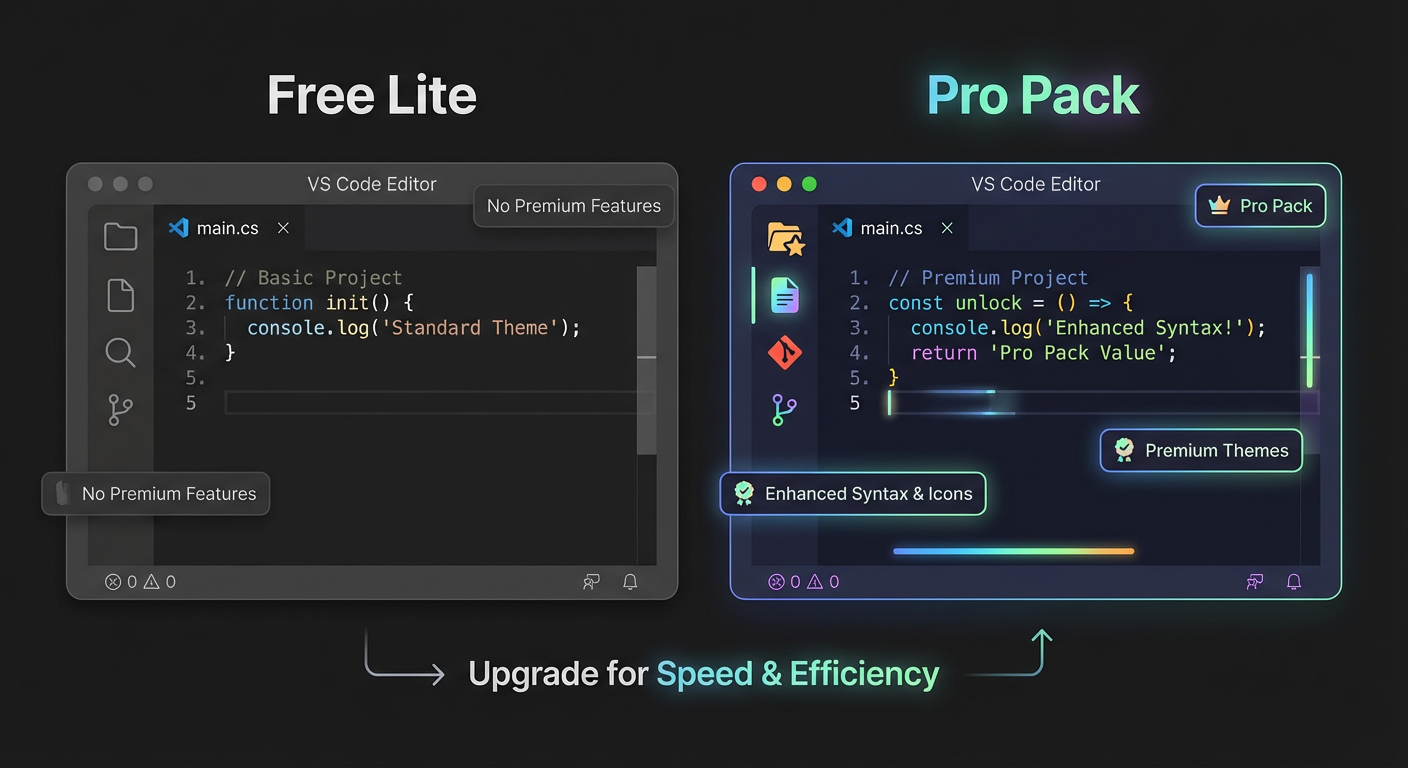
The Freemium Architecture: Lite vs. Pro
The VS Code Marketplace is your primary distribution channel, but it is also a crowded noise machine. To cut through, you need a distribution strategy that leverages the marketplace's traffic without giving away your entire value proposition.
The most effective model for theme revenue is the Freemium Lite strategy.
In this model, the "Lite" version is not a trial; it is a fully functional product that acts as a marketing billboard for your paid version. It lives on the VS Code Marketplace (free), while your "Pro" version lives on a platform like Gumroad or Lemon Squeezy (paid).
Key Insight: Do not cripple your free version. The Free Lite theme must be good enough to get 5-star reviews and high install counts, as marketplace algorithms prioritize popularity. If the free version feels broken, nobody will trust you enough to upgrade.
Here is how you differentiate the two tiers:
| Feature | Free "Lite" Version | Paid "Pro" Version |
|---|---|---|
| Objective | User Acquisition & Trust | Revenue & Retention |
| Color Palette | Standard syntax highlighting (3-5 core colors) | Expanded palette (8+ colors) with high-contrast variants |
| UI Customization | Standard editor UI | Custom workbench, title bars, and activity bars |
| Language Support | General (JS, HTML, CSS) | Specific optimizations (React, Vue, Rust, Python) |
| Bonuses | None | Custom Icon Pack, Font recommendations, Wallpapers |
| Support | GitHub Issues (Community) | Priority Email Support |
Your goal is to make the upgrade a logical "no-brainer" for the power user. The developer using your Lite theme for 8 hours a day will eventually ask, "I wish this had a darker sidebar" or "I wish the React props popped more." The Pro version answers that specific desire.
Pricing Psychology: Why $9-$29 Works
Developers often undervalue their work, pricing themes at $1 or $2, thinking low prices drive volume. This is a fallacy. In the B2B and developer tools space, price signals quality. A $2 theme looks like a risk; a $19 theme looks like a serious tool.
You are targeting professionals earning $60k-$120k+. For this demographic, the difference between $5 and $20 is negligible if the product saves them cognitive load or makes them feel good about their workspace.
Recommended Pricing Tiers:
-
The Impulse Buy ($9 - $14): This acts as your entry-level paid tier. It usually includes the Pro Theme and perhaps one dark/light variant. It is priced equivalent to a fast-food lunch. The friction to purchase here is incredibly low for a gainfully employed developer.
-
The Value Anchor ($19 - $29): This is where you want the majority of your sales. This pack includes the Pro Theme, all variants (High Contrast, Midnight, Soft), a custom Icon Pack, and perhaps a PDF guide on "Configuring VS Code for Productivity." By pricing this only slightly higher than the basic tier, you make it the obvious choice.
-
The Team/Agency License ($149+): Always include a tier for teams. Companies often have a budget for tooling. If a lead dev wants to buy licenses for their team of 10, do not make them buy 10 individual copies. Offer a bulk license. You only need to sell two of these a month to make a significant dent in your revenue goal.
Pro Tip: Use "Price Anchoring" on your landing page. Place the $149 Team License on the right and the $9 Basic License on the left. The $19 Complete Pack in the middle will seem incredibly reasonable by comparison.
The Revenue Forecast: Doing the Math
"I want to make $3,000" is a wish. "I need 158 sales at $19" is a plan.
To build a realistic forecast, you need to work backward from your revenue goal using conservative conversion rates. In the digital product space, a conversion rate of 1% to 3% from a targeted landing page is standard. However, conversion from a free user to a paid user generally hovers between 0.5% and 1.5%.
Let's look at the math for a $1,000/month target:
- Average Order Value (AOV): $19 (The Complete Pack)
- Sales Needed: ~53 sales per month
- Weekly Target: ~13 sales per week
How do we get 53 sales?
If we assume a 1% conversion rate from free installs to paid upgrades (which is conservative but safe):
- Required Free Installs: 5,300 per month.
- Required Marketplace Impressions: ~50,000 - 80,000 (depending on click-through rate).
This highlights why Section 1 (Validation) was so critical. If you are targeting a niche that only has 500 searches a month, the math doesn't work. You need a niche with enough volume to support these numbers.
The "Launch Spike" vs. Recurring Revenue
Realize that theme revenue is rarely a flat line. It typically looks like this:
- Launch Month: High spike ($1k-$3k) due to launch efforts on Product Hunt, Reddit, and Twitter.
- Stabilization: Revenue drops to a baseline ($300-$500/month) based on organic marketplace traffic.
- Growth: Revenue climbs back up as you release updates, add variants, and grow your email list.
Your goal for this course is to engineer that initial spike and set up the systems that maintain the baseline.
Validating Your Specific Offer
Before moving to the design phase in the next section, you must write down your offer hypothesis. Do not keep it in your head.
Action Item: Draft Your "Offer Stack"
Open a document and define the following:
- The Hook: One sentence describing the aesthetic (e.g., "Cyberpunk neon for React developers").
- The Free Lite Features: What specifically will users get for $0?
- The Pro Features: List 3 distinct reasons someone will upgrade.
- The Price: Set your launch price and your "full" price.
What You'll Build On
In the upcoming sections, we will execute this plan with precision.
- In Section 3 (Design Systems), we will create the "Pro" features you defined here, ensuring the color palette justifies the price tag.
- In Section 5 (Marketplace Logistics), we will set up the technical funnel that drives users from the VS Code extension tab directly to your checkout page.
- In Section 6 (The Launch), we will use the pricing tiers you established to run a scarcity-based launch campaign.
By defining your revenue model now, you prevent the common trap of "over-designing." You are no longer just tweaking colors until they look pretty; you are building specific features to drive specific upgrades. This clarity will speed up your development time significantly.
Now that we know what we are selling and how much we are charging, we can open VS Code and start building the asset itself. In the next section, we translate this business logic into a cohesive design system.
Course Details
- Sections8 sections
- Price$9.99