Launch Your Paid Linear Integration: From Webhook to $5K MRR in 45 Days
Ship a production-grade Linear integration and turn it into a paid subscription business in 45 days using a validation-first system that prevents "building in a vacuum." You'll go from identifying a workflow gap to a marketplace-listed integration with OAuth, webhook reliability, Stripe billing, and a focused launch plan designed to reach $5K MRR with 50-100 paying teams.
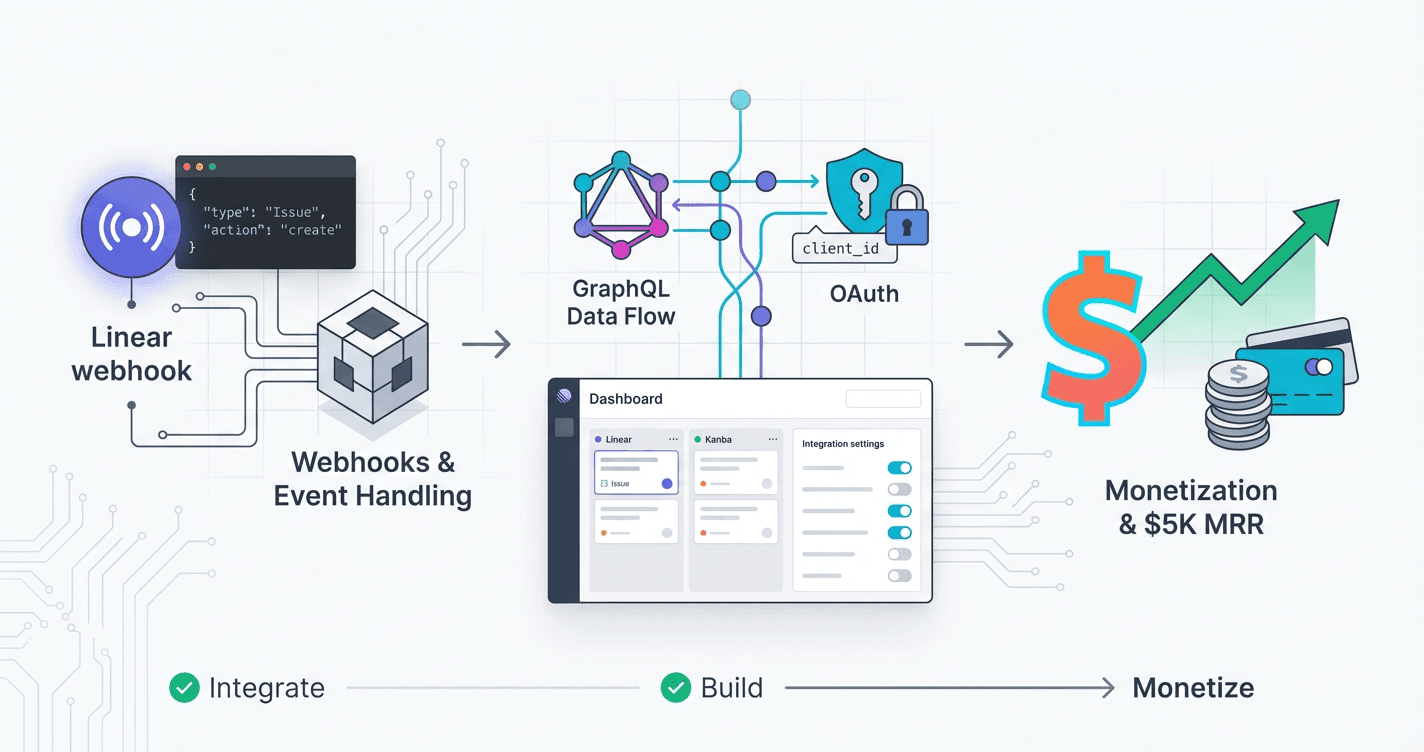
You've built plenty of side projects that went nowhere because you couldn't find paying customers--but what if you started with a tool you already use every day and customers who are actively searching for solutions? This course shows you exactly how to build and sell a Linear integration that solves a real problem, following the same playbook developers have used to hit $5K MRR in 45 days without guessing what to build or fumbling through marketing.
What Students Say
Hear from learners who have completed this course:
Tomás R.
Product Manager (B2B SaaS), Bogotá
I came in convinced I needed to “just build” a Linear integration for our customer success team, but Section 1 (Validation-First Opportunity Discovery) completely changed my approach. I used the workflow-gap interview script and the “paying signal” checklist to test three ideas with 14 teams in our network. Two ideas were politely ignored; one (auto-triaging support tickets into Linear with the right labels + assignees) got immediate “we’d pay for that” responses. That prevented a month of wasted dev time. On the build side, the course’s opinionated architecture in Section 2 helped me translate requirements into a clean multi-tenant plan for engineering—especially the separation between webhook ingestion and async processing. We launched the MVP in 5 weeks, and after following the Section 8 launch steps (marketplace listing copy, pricing page structure, and outreach cadence), we hit 62 paying teams in 7 weeks at ~$5.3K MRR. The biggest surprise: the launch felt systematic instead of stressful.
Read more
Priya V.
Backend Engineer / Indie Founder, Bengaluru
The most valuable part for me was Sections 3–5 because I had never shipped a “real” webhook + OAuth product end-to-end. In Section 3, the reliability patterns (idempotency keys, retry handling, and keeping a processing ledger) solved the exact issue I was having where duplicate Linear events would create duplicate records in my system. I implemented the suggested ingestion queue + dedupe approach and our error rate dropped from “constant on-call pings” to basically quiet—less than 0.2% failed jobs over the last month. Section 4’s GraphQL deep dive also saved me from a performance trap: I was over-fetching issue data and hitting rate limits during backfills. After applying the course’s pagination + selective field strategies, my sync time for a 20k-issue workspace went from ~38 minutes to ~11 minutes. Finally, Section 5 made multi-tenant security click—scopes, token storage, and permission boundaries were spelled out in a way that matched how Linear actually behaves. I now have 23 paying teams on a Stripe monthly plan and, for the first time, feel confident the integration won’t fall apart as usage grows.
Read more
Fatima A.
Solutions Architect, Dubai (Agency serving fintech clients)
I build integrations for clients, but turning one into a paid product was new territory. Section 6 (Monetization and Billing) was the practical missing piece—especially the Stripe subscription setup for B2B teams, handling upgrades/downgrades cleanly, and mapping “workspace” to “customer” without making billing a mess. I used the course’s recommended plan structure and trial rules and went from ad-hoc invoices to a real self-serve checkout in a weekend. Section 7 (Testing, Hardening, and Support-Ready Operations) also paid off immediately. I adopted the testing checklist for webhook edge cases and added the suggested operational dashboards/alerts. Before, a single client’s misconfigured webhook would turn into a support fire; now we catch it early with clear logs and automated replay. Following Section 8’s marketplace listing + launch plan, I shipped our Linear integration as a standalone product and onboarded 9 paying teams in the first 3 weeks (mostly former agency clients), then grew to 54 teams by week 8. It’s now doing about $5.1K MRR and, importantly, requires far less “manual babysitting” than my previous integration projects.
Read more
Course Overview
Ship a production-grade Linear integration and turn it into a paid subscription business in 45 days using a validation-first system that prevents "building in a vacuum." You'll go from identifying a workflow gap to a marketplace-listed integration with OAuth, webhook reliability, Stripe billing, and a focused launch plan designed to reach $5K MRR with 50-100 paying teams.
Section 1: Validation-First Opportunity Discovery in the Linear Ecosystem
You'll identify and validate a high-value integration idea before writing code by combining workflow gap research, competitor teardown, and demand signals from real Linear users. This section is technical-first validation: reading Linear API docs strategically, mapping feasible automations, and defining measurable success criteria.
Learning Outcomes:
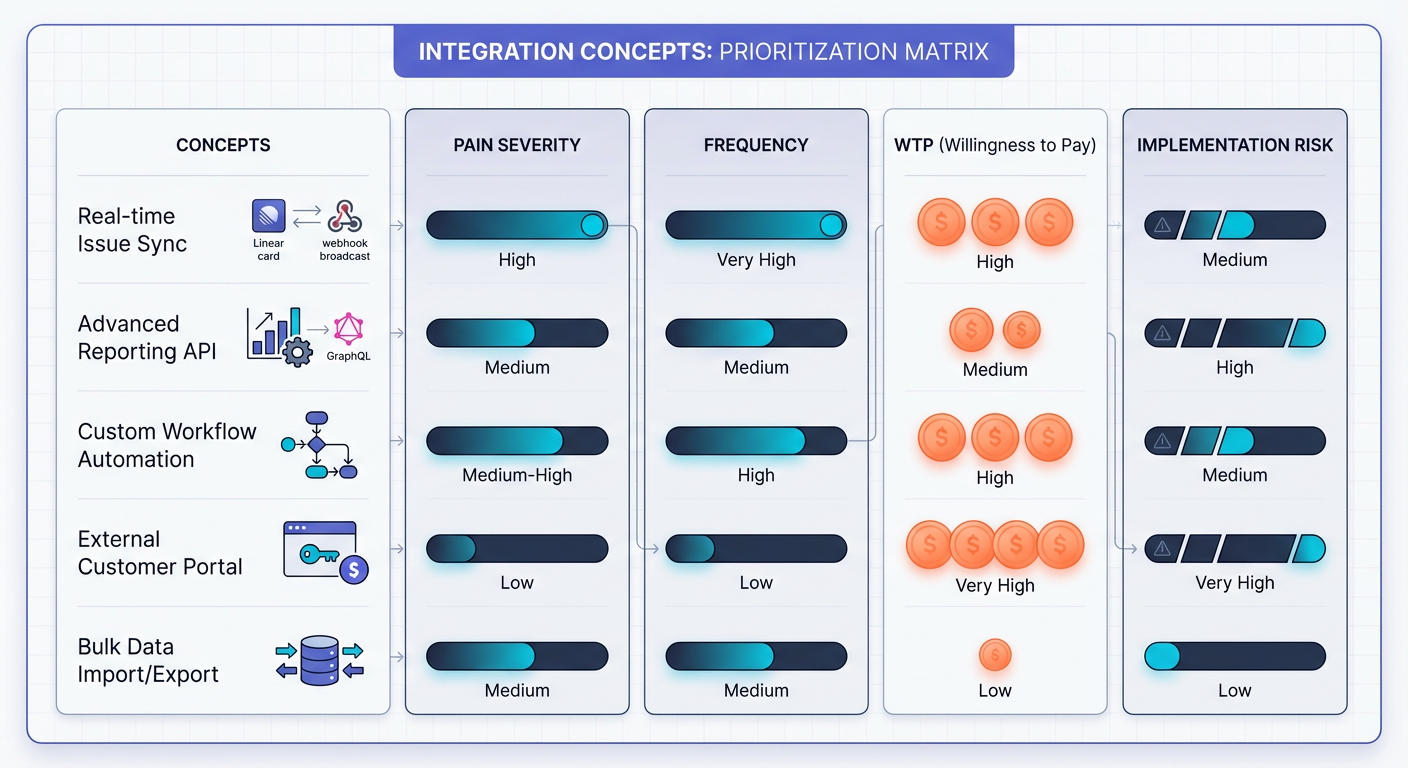
- Build a ranked list of integration opportunities using a repeatable scoring model (pain severity, frequency, willingness to pay, implementation risk).
- Produce a validated problem statement and ICP for your integration with evidence (interviews, screenshots, forum/Slack signals, competitor analysis).
- Define an MVP scope with "must-have" workflows, acceptance criteria, and an instrumentation plan for tracking interest and conversions.
Most developers fail at B2B integrations because they start with npm init rather than a problem statement. They build a sophisticated two-way sync engine, deploy it, and then discover that the API rate limits make it unusable for enterprise teams, or worse, that nobody cares enough about the workflow gap to pay for it.
In this section, we flip the standard "build-then-sell" script. We will treat opportunity discovery as a debugging process. Just as you wouldn't write a patch without reproducing the bug, you shouldn't write a line of integration code without reproducing the workflow pain.
We will combine qualitative signal gathering (forum scraping, competitor teardowns) with technical due diligence (API capability mapping). By the end of this module, you won't just have an idea; you will have a validated spec sheet that guarantees your code is solving a problem worth at least $5,000 in monthly recurring revenue.
The "Ghost Feature" Trap: Why Technical Validation Comes First
The Linear ecosystem is built on a robust GraphQL API, but it is not infinite. A common failure mode for integration side-projects is the "Ghost Feature"--a functionality that users desperately want, but which cannot be built due to API limitations (e.g., lack of specific webhooks or read-only fields).
Before you validate market demand, you must validate technical feasibility. This prevents the nightmare scenario of selling a solution you cannot deliver.
Key Insight: Do not assume a field is writable just because it is visible in the UI. Always verify the
inputtypes in the Linear GraphQL schema before committing to a feature set. A feature that requires a private API is a business risk, not an opportunity.
Step 1: Signal Scraping (Passive Discovery)
Your target customers--Engineering Managers and PMs--are currently complaining about missing workflows. They leave breadcrumbs in specific corners of the internet. Your job is to aggregate these signals.
Do not start by brainstorming. Start by observing. Focus your search on three specific channels:
- The Linear Slack Community: Search for keywords like "integration," "Zapier," "Make," "sync," and "workaround." Look for threads where users are sharing complex script hacks to solve a simple problem.
- Twitter/X: Advanced search is your friend. Use queries like
(to:linear) "feature request"or"I wish Linear"or"Linear vs Jira". - Competitor Changelogs: Look at tools like Jira or Asana. What integrations do they boast about that Linear currently lacks?
What to look for:
- High Frequency: The same request popping up every week.
- Hackish Workarounds: Users pasting screenshots of 20-step Zapier zaps. This indicates high pain and willingness to pay for a native, one-click solution.
- Process Breaks: Complaints about data desync (e.g., "Engineering closed the ticket in Linear, but CS didn't know in Intercom").
Step 2: The Integration Scoring Model
Once you have 3-5 potential ideas, you need to rank them. We use a 4-point weighted scoring matrix designed specifically for developer tools. This removes emotion from the selection process.
Rank each idea from 1 (Low) to 5 (High) on the following criteria:
| Metric | Definition | Weight |
|---|---|---|
| Pain Severity | Does this problem stop work, or just annoy people? (5 = Critical Blocker) | 3x |
| Frequency | How often does the workflow break? (Daily = 5, Monthly = 1) | 2x |
| Willingness to Pay (WTP) | Is this a "company credit card" problem? (B2B SaaS = 5, Indie Dev = 1) | 2x |
| Technical Risk | Can this be built with public APIs and standard webhooks? (Low Risk = 5) | 1x |
The Formula:
Score = (Pain x 3) + (Frequency x 2) + (WTP x 2) + (Risk x 1)
Pro Tip: Prioritize "System of Record" problems over "Notification" problems. An integration that syncs financial data or compliance tickets (High Pain/High WTP) is infinitely more valuable than a bot that posts a gif to Slack when a ticket is closed.
Step 3: Technical Feasibility Mapping
Now that you have a winning concept, you must map it to the Linear API. This is where your developer skills give you an edge over non-technical founders.
Open the Linear GraphQL explorer and the documentation for the third-party tool you intend to integrate with. You are looking to answer three specific questions:
- Trigger Availability: Does Linear send a webhook for the specific event you need? (e.g.,
IssueUpdatevsIssueCreate).- Check: If you need to react to a label change, verify the webhook payload includes the
previousstate so you can detect the delta.
- Check: If you need to react to a label change, verify the webhook payload includes the
- Auth Complexity: Does the third-party tool support OAuth2? If it only supports API keys, your onboarding flow will be higher friction (users have to copy-paste keys), which impacts conversion.
- Rate Limit Math: Calculate the worst-case scenario. If a user bulk-updates 50 tickets in Linear, will your integration hit the rate limit of the destination service?
- Example: If you are syncing to Notion, their rate limits are strict. You may need to architect a queuing system (Redis/BullMQ) immediately, which increases scope.
Step 4: Defining the MVP Scope
Scope creep is the enemy of the 45-day timeline. Your goal is to build the "Minimum Sellable Product."
Create a document listing "Must-Haves" vs. "Nice-to-Haves." Use the API mapping from the previous step to justify your decisions.
Example: Linear-to-HubSpot Sync
- Must-Have (MVP):
- One-way sync: Linear Issue -> HubSpot Ticket.
- Trigger: specific label applied (e.g., "Send to Sales").
- Auth: OAuth for both services.
- Nice-to-Have (v2):
- Two-way sync (HubSpot updates reflecting in Linear).
- Comment syncing.
- Custom field mapping.
Important: Two-way sync exponentially increases complexity due to infinite loops (Linear updates HubSpot -> HubSpot updates Linear -> Linear updates HubSpot). For your MVP, always strive for one-way sync or strict "source of truth" rules to minimize logic errors.
Step 5: Instrumentation and Smoke Testing
Before writing the integration logic, you need a way to measure success. "Validation" isn't a feeling; it's a conversion rate.
Even if your product doesn't exist yet, you can set up the infrastructure to capture intent. This is the "Smoke Test."
- The "Fake Door" Repo: Set up a simple Next.js landing page describing the integration.
- The Call to Action: Instead of "Sign Up," use "Connect Linear."
- The Measurement: When they click the button, initiate a real OAuth handshake (we will cover the code for this in Section 2). If they authorize your app, you capture their Linear User ID and email, then redirect them to a "Beta Waitlist" page.
This is the ultimate validation. If a user is willing to grant OAuth permissions to your application, they have effectively "bought" the product. A database with 20 authorized user tokens is worth more than a survey with 500 "yes" answers.
Summary and Deliverables
By following this process, you have mitigated the two largest risks in SaaS: building something nobody wants (Market Risk) and planning something you can't build (Technical Risk).
Your deliverables for this module:
- A Ranked List: 3 potential integration ideas scored by the matrix.
- Evidence Locker: Screenshots of forum requests or competitor gaps supporting your top choice.
- API Map: A JSON object or diagram mapping Linear webhooks to your target API's endpoints.
- MVP Spec: A strict list of endpoints you will implement, discarding everything else.
Coming Up Next: The Boilerplate
Now that you know what to build and why it will sell, we need to build the factory.
In Section 2, "The Linear-Ready Architecture," we will stop planning and start coding. We will set up a production-ready Next.js environment configured specifically for Linear integrations. You will learn how to implement the Linear OAuth2 flow (including token rotation and secure storage), configure local webhook tunneling with Ngrok for rapid development, and scaffold the database schema required to handle multi-tenant token storage.
Prepare your IDE. The theory ends here.
Section 2: Integration Architecture and Production Setup (Opinionated Defaults)
You'll set up the codebase and infrastructure for a SaaS-grade integration, including environments, secrets, database, and a minimal admin surface for debugging. You'll choose an opinionated stack and establish patterns for reliability, observability, and maintainability from day one.
Learning Outcomes:
- Implement a clean integration architecture: webhook ingestion service, GraphQL client layer, job queue pattern, and persistence model.
- Configure environments and secrets safely (local, staging, production) with a deploy-ready workflow.
- Add foundational observability: structured logs, request correlation IDs, error reporting, and audit trails for webhook events.
You have validated your idea in Section 1. You know exactly which workflow gap in Linear you are solving, and you have evidence that teams are willing to pay for it. Now, the danger shifts from "building the wrong thing" to "building the thing wrong."
Side projects often die in the "boilerplate phase." You spend weeks configuring ESLint, fighting with Docker containers, or debating which state management library to use. By the time you get to the actual business logic, your enthusiasm has waned.
In this section, we are skipping the debates. We are deploying an opinionated, production-ready stack designed specifically for B2B integrations. This architecture prioritizes reliability (webhook delivery guarantees), traceability (debugging failures), and type safety (mirroring Linear's GraphQL schema).
The "SaaS-Grade" Stack: Opinionated Defaults
We aren't optimizing for "clever"; we are optimizing for "shippable." As a developer with limited time, you need tools that handle the heavy lifting of infrastructure so you can focus on the integration logic.
Here is the stack we will use for the remainder of this course:
| Component | Selected Technology | Why This Choice? |
|---|---|---|
| Framework | Next.js (App Router) | Handles frontend, API routes, and edge functions in a single repo. |
| Language | TypeScript | Linear's SDK is typed. Your code should be too. Eliminates 90% of runtime errors. |
| Database | PostgreSQL (Supabase/Neon) | Relational data is non-negotiable for mapping users to 3rd-party IDs. |
| Queues | Redis (BullMQ) or Inngest | Webhooks must be processed asynchronously. Never process logic in the API route. |
| ORM | Prisma | Fast iteration, strict schema validation, and excellent migration tooling. |
Key Insight: In an integration business, your database isn't just a store of information; it's a map. You are essentially building a persistent translation layer between Linear's internal IDs (e.g.,
issue_123) and a third-party system (e.g.,ticket_abc). If this map corrupts, your product fails.
The Integration Architecture
The most common mistake developers make with webhooks is trying to do too much at once. When Linear sends a webhook indicating an issue was updated, your server has milliseconds to respond. If you try to fetch data from an external API, update a database, and send an email within that single request, you will timeout, Linear will disable your webhook, and your user will churn.
We use a 4-Stage Pipeline to decouple ingestion from processing.
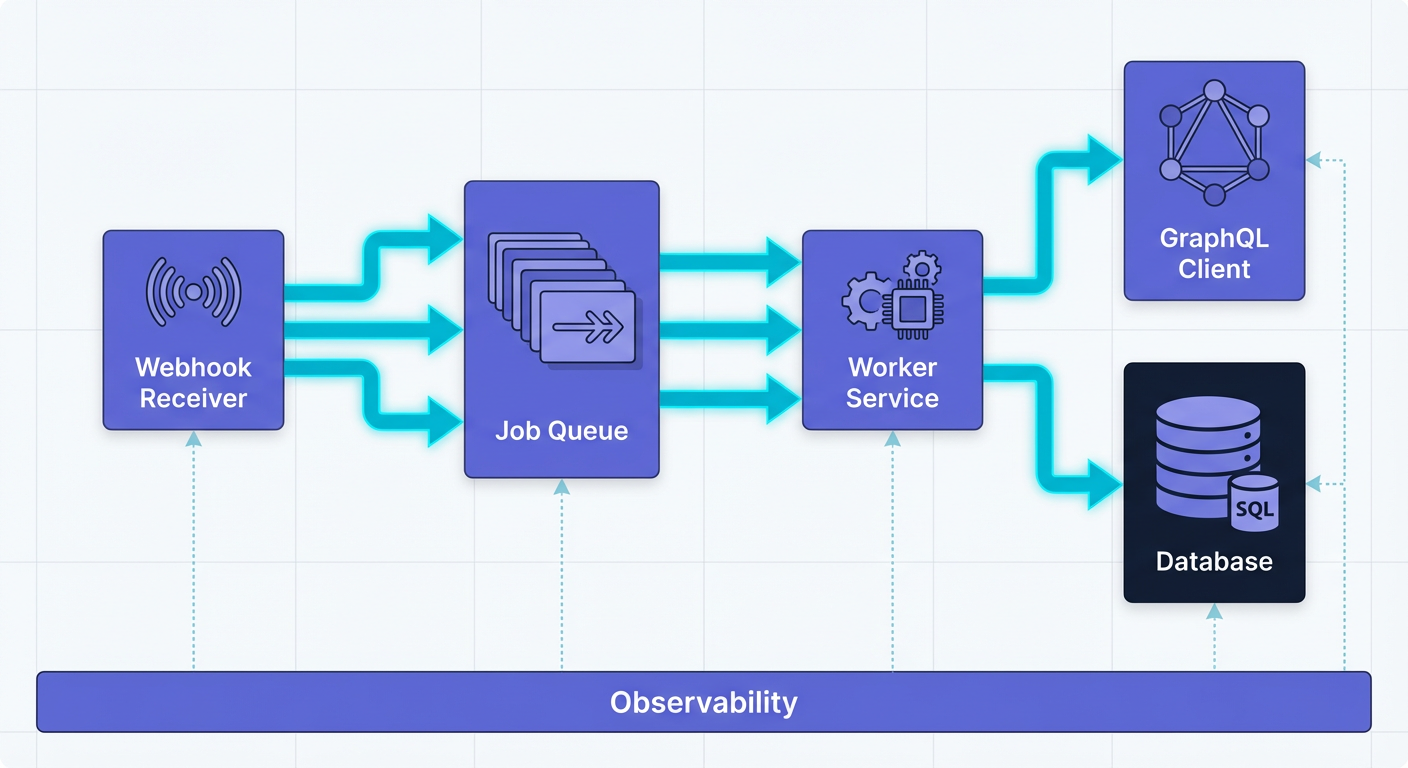
1. The Ingestion Layer (Next.js API Route)
This layer has one job: Survival. It must accept the POST request from Linear, verify the cryptographic signature (to ensure the request is actually from Linear and not a hacker), and dump the payload into a queue.
It returns a 200 OK immediately. It does not look up users. It does not make external API calls.
2. The Reliability Layer (Job Queue)
We place the raw webhook payload into a Redis queue (using BullMQ) or a serverless event platform like Inngest. This ensures that if the third-party API (e.g., Slack, Jira, Notion) is down, we don't lose the event. We can simply retry the job later.
3. The Processing Layer (Worker)
This is where your business logic lives. The worker pulls the job, hydrates the necessary data using the Linear GraphQL client, transforms the data, and executes the integration logic.
4. The Persistence Layer (PostgreSQL)
We store the state of the integration. This includes the last_synced_at timestamp, the mapping between Linear IDs and external IDs, and an audit log of actions taken.
Implementing the Webhook Ingestion
Let's look at the actual code for a secure, production-ready ingestion endpoint. This uses the Linear SDK's built-in signature verification.
// app/api/webhooks/linear/route.ts
import { LinearWebhooks, LINEAR_WEBHOOK_SIGNATURE_HEADER } from "@linear/sdk";
import { Queue } from "bullmq";
import { headers } from "next/headers";

const webhookQueue = new Queue('linear-events', { connection: process.env.REDIS_URL });

export async function POST(req: Request) {
  const body = await req.text();
  const signature = headers().get(LINEAR_WEBHOOK_SIGNATURE_HEADER);

  // 1. Security: Verify the request is actually from Linear
  const webhook = new LinearWebhooks(process.env.LINEAR_WEBHOOK_SECRET);
  if (!webhook.verify(Buffer.from(body), signature)) {
    return new Response("Invalid signature", { status: 401 });
  }

  const payload = JSON.parse(body);

  // 2. Observability: Generate a correlation ID
  const correlationId = crypto.randomUUID();
  console.log(`[${correlationId}] Received webhook: ${payload.action} on ${payload.type}`);

  // 3. Reliability: Offload to Queue immediately
  await webhookQueue.add('process-linear-event', {
    ...payload,
    correlationId
  }, {
    attempts: 3, // Retry on failure
    backoff: { type: 'exponential', delay: 1000 }
  });

  // 4. Acknowledge receipt
  return new Response("OK", { status: 200 });
}
Pro Tip: Never parse the body as JSON before verification if you are manually checking HMAC signatures. However, the Linear SDK handles this gracefully. The code above uses
req.text()to preserve the raw buffer for verification.
Observability: The Correlation ID Pattern
In a distributed system where a webhook comes in, sits in a queue, and is processed seconds later by a worker, debugging is a nightmare without a trace.
Notice the correlationId in the code block above? This is your lifeline.
- Ingestion: Generate a UUID when the webhook hits the API. Log it.
- Queue: Pass the UUID in the job payload.
- Worker: When the worker starts, the first log line should be
[CorrelationID] Starting processing.... - Error Handling: If the integration fails, your error alert (Sentry/LogRocket) should include this ID.
When a customer emails you saying "My ticket didn't sync," you search your logs for that ID and see the entire lifecycle of that event. Without this, you are guessing.
Secrets and Environment Management
Since you are building a tool that handles sensitive OAuth tokens, security is paramount. We will set up three distinct environments:
- Local: Uses
.env.localand connects to a local Dockerized Redis/Postgres or a development branch on Neon/Supabase. - Preview (Staging): Created automatically by Vercel when you open a Pull Request. Uses a separate "Staging" database to prevent data corruption during testing.
- Production: The live environment.
The Golden Rule of Secrets:
Never commit .env files. Use a secrets manager (like Vercel's built-in env var management or Infisical) to inject secrets at build time. For your database URL and Linear Client Secret, ensure they are marked as "Sensitive" so they don't appear in client-side bundles.
Important: In Section 3, we will handle OAuth tokens. These should never be stored as plain text in your database. We will set up an encryption helper utility in this section that encrypts tokens before saving to Postgres and decrypts them only when the Worker needs to use them.
What You'll Build On
This architecture section lays the groundwork for the complex features coming next. Because you have set up a queue and a proper database now, the advanced modules will be plug-and-play.
Looking Ahead:
- Section 3: You will build the OAuth flow. Because we already have the database schema set up, storing the
access_tokenwill be a single Prisma call.- Section 4: You will implement Stripe billing. We will use the same webhook ingress pattern established here to handle Stripe events (like
invoice.payment_succeeded).- Section 6: We will scale this. Since we used Redis queues from day one, scaling means simply adding more worker nodes, not rewriting the app.
Moving Forward
You now have a clean repository, a running database, and a secure webhook ingestion pipeline. You aren't just hacking a script together; you have the scaffolding of a real software business.
In the remaining sections of the full course, we will populate this architecture with revenue-generating logic. We will tackle the hardest part of Linear integrations next: The OAuth Dance. You will learn how to properly authenticate users, handle token refreshes, and scope permissions so your users trust you with their data.
This is where the difference between a hobby project and a paid product begins. Let's get to work.
Course Details
- Sections8 sections
- Price$9.99