Advanced SEO for SaaS Founders: Drive 10K Organic Visitors in 60 Days
Build a founder-friendly SEO system that turns your SaaS website into a predictable acquisition channel without agencies or guesswork. In 8 weeks you'll fix technical bottlenecks, identify and prioritize revenue-driving keywords, ship conversion-focused content fast, earn legitimate B2B links, and instrument analytics so you can prove ROI and scale to 10K qualified organic visitors.
Your paid ads are bleeding cash while competitors quietly steal your customers through Google search. This course shows you the exact SEO system that took my SaaS from 800 to 12,000 monthly organic visitors in 58 days, using frameworks you can implement this week, not generic theory you will never use. No agencies, no guesswork, just a repeatable playbook that finally makes SEO feel like the predictable growth channel you have been desperate to build.
What Students Say
Hear from learners who have completed this course:
Tomás R.
Co-founder & CEO, B2B compliance SaaS
I’d tried “SEO” a few times and it always felt like random blog posts and hope. Section 1 forced me to set a 60‑day target with leading indicators (indexed pages, impressions, demo-page CTR) instead of just traffic. The technical audit in Section 2 was the real unlock: I found a noindex tag on our /integrations/ pages and cleaned up duplicate parameter URLs that were eating crawl budget. After implementing the checklist and the internal linking map from Section 5, our demo landing page moved from position 11 to 5 for our main “compliance automation software” term. Results: 6,800 → 12,400 monthly organic sessions in 7 weeks and, more importantly, 19 demo requests attributed to organic (previously 6). I finally have a repeatable system instead of guessing.
Read more
Priya V.
Head of Growth, developer tools SaaS
The revenue-based keyword prioritization in Section 3 changed how I plan content. I stopped chasing high-volume “what is X” terms and built a pipeline around high-intent queries like “SOC 2 checklist template” and “best CI/CD monitoring tool,” scored by signup likelihood. Section 4’s content brief template made my writers faster—each brief had H2 structure, PAA questions, and required product screenshots. We shipped 10 pieces in a month (normally 4–5). Section 8 helped me fix attribution: I set up GSC + GA4 landing page reporting and a simple “organic assisted conversion” view for trials. In 60 days we went from ~2.3K to 9.7K organic sessions and trial signups from organic rose 28% without increasing ad spend. It felt founder-practical, not agency fluff.
Read more
Yuki T.
Product Marketing Manager, HR SaaS (mid-market)
I joined because our SEO was ‘a blog’ and nothing tied back to pipeline. Section 5 (on-page SEO that converts) was the most useful for my role—especially rewriting titles/meta for SERP CTR and aligning copy blocks to the actual “jobs to be done” on feature pages. I used the course’s CTR checklist to update 15 pages; our average CTR in Search Console went from 1.6% to 2.5% on the pages we touched. I also implemented the “non-spam” B2B link approach from Section 7 by turning two customer case studies into co-marketed posts; we earned 9 relevant referring domains (not random directories). Net impact: organic traffic grew 41% in two months and our “employee onboarding software” feature page started generating demos weekly instead of monthly.
Read more
Course Overview
Build a founder-friendly SEO system that turns your SaaS website into a predictable acquisition channel without agencies or guesswork. In 8 weeks you'll fix technical bottlenecks, identify and prioritize revenue-driving keywords, ship conversion-focused content fast, earn legitimate B2B links, and instrument analytics so you can prove ROI and scale to 10K qualified organic visitors.
Section 1: Baseline, Goals, and the 60-Day SEO Game Plan
You'll define what "qualified traffic" means for your SaaS, set realistic targets tied to pipeline and revenue, and establish a measurable starting baseline. This section turns SEO into an execution plan with weekly deliverables and decision rules.
Learning Outcomes:
- Define your SEO success metrics (10K visitors, trial/demo conversion rate, CAC impact, payback) and map them to your funnel.
- Create a 60-day execution plan with weekly milestones and a "minimum publish cadence" that fits a founder schedule.
- Set up a baseline snapshot (rankings, index coverage, conversions, top pages) to measure lift week over week.
Most SaaS founders treat SEO like a lottery ticket: they buy a few blog posts, hope for a viral hit, and give up when the jackpot doesn't arrive in thirty days. Meanwhile, they continue to spend $5,000 to $10,000 a month on Google Ads, renting attention that vanishes the second the credit card declines.
To build a predictable acquisition channel, you must stop thinking like a marketer and start thinking like an engineer. SEO is not magic; it is an algorithm with inputs (content, technical structure, authority) and outputs (rankings, traffic, revenue).
In this section, we are ignoring vanity metrics. We are establishing a baseline, defining what "qualified" actually looks like for your pipeline, and deploying a 60-day execution plan that respects your limited bandwidth.
Redefining Success: Revenue Over Traffic
The most dangerous number in SEO is "total traffic." For a B2B SaaS, 10,000 random visitors are a liability--they skew your analytics and inflate your server costs without contributing to MRR. You do not need 100,000 visitors to grow a $500K ARR business; you need 2,000 visitors who are actively looking for a solution to the problem your software solves.
We are shifting your KPI (Key Performance Indicator) hierarchy immediately.
Key Insight: A visitor who reads a definition of "project management" is worth $0. A visitor comparing "Jira vs. Asana vs. [Your Tool]" has their credit card in hand. We optimize for the wallet, not the eyeballs.
Your new success metrics are:
- Non-Branded Organic Traffic: Visitors finding you via keywords that do not contain your company name.
- High-Intent Conversion Rate: The percentage of organic traffic that triggers a "Trial Start" or "Book Demo" event.
- CAC Delta: The difference in acquisition cost between your paid channels and your blended organic efforts over a 6-month payback period.
The Baseline Snapshot
You cannot optimize a system you haven't measured. Before writing a single word of content, you must capture a "Day 0" snapshot. This serves two purposes: it proves ROI to your co-founders or investors later, and it helps you debug issues if growth stalls.
Do not rely solely on Google Analytics for this. You need data from the source: Google Search Console (GSC).
Create a spreadsheet with these four columns for your Baseline Audit:
| Metric | Source | Why It Matters | Target (Day 60) |
|---|---|---|---|
| Total Indexed Pages | GSC (Coverage) | Reveals technical bloat or "zombie pages" wasting crawl budget. | Cleaned & Lean |
| Impressions (Non-Brand) | GSC (Performance) | The raw volume of market demand you are currently visible for. | +20% Lift |
| Top 3 Ranking Keywords | Ahrefs / SEMrush | The keywords currently driving your existing organic traffic. | +5 High-Intent Terms |
| Organic Conversion Rate | GA4 / Mixpanel | The baseline efficiency of your current funnel. | 1.5% - 3.0% |
Pro Tip: If your site has 500 indexed pages but only 50 are generating impressions, you have a "quality" problem. Google assesses your site's authority based on the average quality of all indexed pages. We will address pruning these low-value pages in the technical audit module.
The 60-Day Execution Sprint
Founders fail at SEO because they lack a cadence. They write three articles in one weekend, then nothing for two months. To fix this, we operate on a sprint schedule. This plan assumes you have 4-6 hours per week dedicated to this channel.
Phase 1: Foundation & Strategy (Days 1-14)
- Week 1 Deliverable: Technical Audit & Tracking Setup.
- Ensure Google Analytics 4 (GA4) conversions are firing correctly for "Sign Up" and "Demo."
- Fix critical errors (404s, broken redirects) that are bleeding authority.
- Week 2 Deliverable: The "Money" Keyword List.
- Identify 20 bottom-of-funnel keywords (e.g., "alternatives to [Competitor]," "best [Category] software for [Industry]").
- Map these keywords to existing pages or new placeholders.
Phase 2: Creation & Optimization (Days 15-45)
- Week 3-6 Deliverable: The "Minimum Viable Content" Cycle.
- Publish or update one high-quality asset per week.
- Focus on "Pain Point SEO"--content that addresses a specific problem your software solves rather than generic industry news.
Phase 3: Distribution & Authority (Days 46-60)
- Week 7-8 Deliverable: Link Building & Internal Linking.
- Update internal linking structure to funnel authority to your conversion pages.
- Execute one "Digital PR" or guest contribution sprint to acquire 3-5 high-quality backlinks.
The Minimum Viable Publish Cadence
You are not a media company; you are a software company. You cannot publish daily, nor should you.
For a seed-stage or bootstrapped SaaS, the "Minimum Viable Publish Cadence" is one high-impact piece of content every week, or one significant update to an existing page every week.
However, consistency is non-negotiable. Google's algorithm rewards "freshness" and site activity. If you go dark for three weeks, you reset your momentum.
The "Founder Schedule" Content Mix:
- The "Vs" Page (20% effort): Compare your tool to a competitor. These pages have high conversion rates and are fast to write because you know the product differentiators by heart.
- The "How-To" Guide (50% effort): A tactical tutorial solving a user problem, positioning your tool as the solution within the workflow.
- The Case Study (30% effort): Break down a customer win. These serve as social proof and rank for trust-based keywords.
Important: Do not outsource your core "money page" content to a $50/article freelancer. As the founder, you possess specific domain expertise and customer insights that a generalist writer cannot replicate. In the early stages, you draft the outline and the arguments; you can hire an editor to polish the prose later.
Decision Rules: When to Pivot
At the 30-day and 60-day marks, you must review your data to make binary decisions. We use a simple "If/Then" framework to avoid emotional decision-making.
Scenario A: High Impressions, Low Clicks (CTR < 1%)
- Diagnosis: Your content is ranking, but the title tag or meta description is unappealing, or you are not matching search intent.
- Action: Rewrite the title tag to be more click-worthy (add brackets, numbers, or emotional hooks).
Scenario B: High Traffic, Low Conversion (< 0.5%)
- Diagnosis: You are attracting the wrong audience (students, researchers) or your landing page offer is weak.
- Action: Add a clearer Call to Action (CTA) above the fold. Review the keyword intent--are they looking to buy or learn?
Scenario C: No Impressions
- Diagnosis: The content is not indexed, or the keyword is too competitive for your current domain authority.
- Action: Check GSC for indexing errors. If indexed, build 2-3 internal links from your strongest pages to this new page.
Looking Ahead
You now have a baseline and a schedule. The fear of the "SEO Black Box" should be replaced by the clarity of a to-do list. You are no longer guessing; you are executing a logic-based plan to lower your CAC.
In the next section, we dive into the most critical component of this engine: High-Intent Keyword Research. I will show you how to steal your competitors' most profitable keywords and identify the "hidden gem" search terms that drive revenue, not just readers.
Section 2: Technical SEO Audit for SaaS Sites (Fix What Blocks Growth)
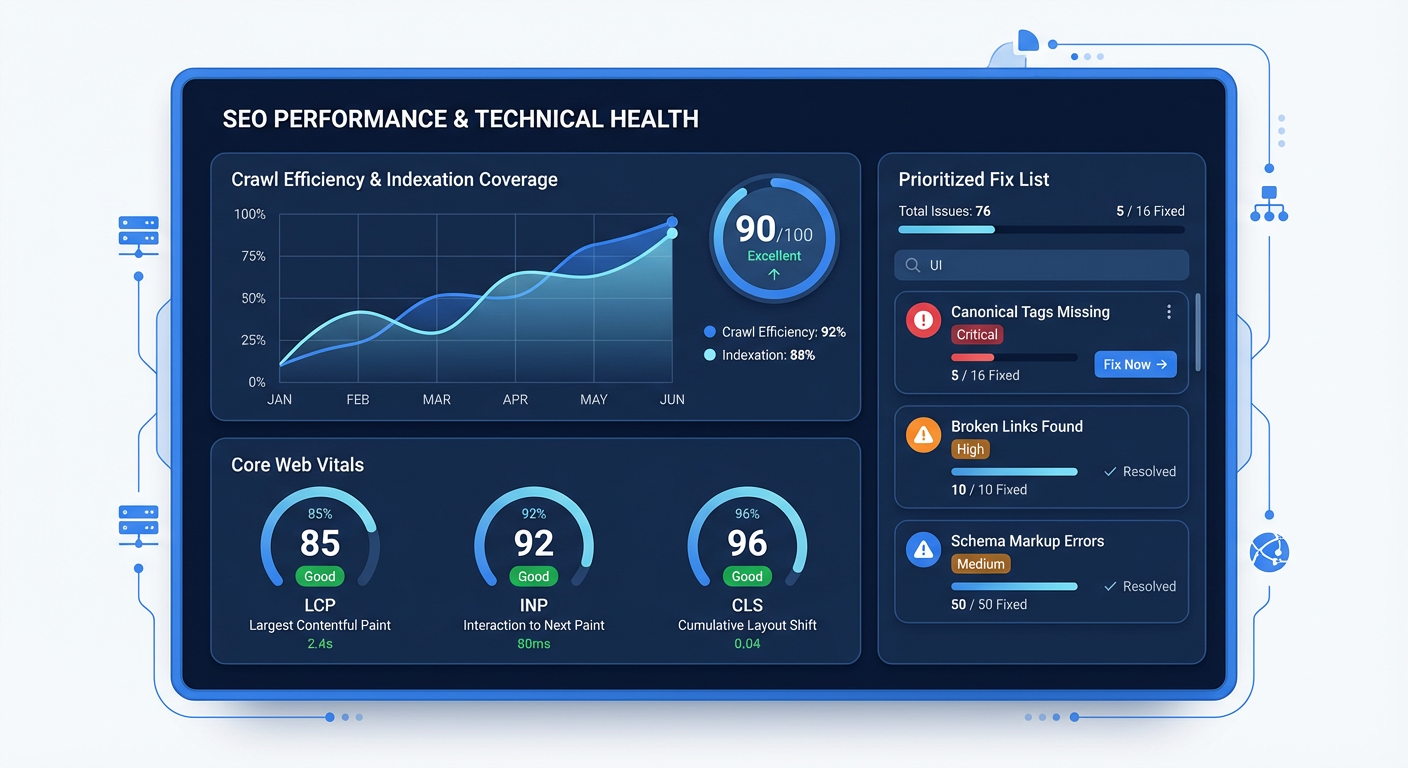
You'll run a practical technical audit focused on the issues that most commonly cap SaaS organic growth: indexation, crawl efficiency, site architecture, performance, and rendering. You'll leave with a prioritized fix list you can execute yourself or hand to an engineer with confidence.
Learning Outcomes:
- Audit and fix indexation and crawl issues using Google Search Console (coverage, sitemaps, canonicalization, robots, thin/duplicate pages).
- Improve Core Web Vitals and performance bottlenecks that impact rankings and conversions (LCP, INP, CLS) with a clear checklist.
- Implement SaaS-ready site architecture (logical URL structure, internal linking, navigation) that supports both feature pages and content at scale.
In Section 1, we established your baseline metrics and defined a revenue-focused goal: driving 10k qualified visitors to reduce your CAC. Now, we stop planning and start debugging.
Think of Technical SEO not as a marketing task, but as a DevOps requirement. If your infrastructure is broken, it doesn't matter how high-quality your content is--Google simply won't serve it. For SaaS companies specifically, technical debt in SEO is often the silent killer of growth. You push code updates daily, use complex JavaScript frameworks, and generate thousands of dynamic URLs. This creates a messy environment that search engine bots hate.
In this section, we are going to run a lean, high-impact audit. We aren't trying to achieve a perfect "100" score on a generic tool. We are looking for the specific blockers that prevent your SaaS from being indexed and ranked.
The Indexation Audit: Google Search Console
Disregard expensive third-party tools for a moment. The only source of truth that matters is Google Search Console (GSC). Your first step is determining if Google is even inviting you to the party.
Navigate to Indexing > Pages in GSC. You will likely see a gray bar (Not Indexed) and a green bar (Indexed).
Key Insight: It is normal for a SaaS site to have many non-indexed pages (login screens, admin dashboards, internal parameters). However, you need to panic if your feature pages or blog posts are landing in the gray bar.
Look for these two specific error types in the "Why pages aren't indexed" section:
- Discovered - currently not indexed: Google knows the URL exists but didn't bother crawling it. This usually means your server is slow, or Google thinks your site has low quality/value, so it's saving its crawl budget for elsewhere.
- Crawled - currently not indexed: Google read the page and decided not to put it in the search results. This is almost always a content quality issue (thin content) or a technical duplication issue.
The Fix Protocol
If you find priority pages in these buckets, execute this checklist:
- Internal Linking: Ensure the page isn't an "orphan." It must be linked from your nav, footer, or a high-authority parent page.
- Check Canonical Tags: View the source code. Does the page point to itself as the canonical version, or is it accidentally telling Google "I am a copy of another page"?
- Force Re-crawl: Once you make a change, use the "Inspect URL" tool in GSC and click "Request Indexing."
SaaS Architecture: Handling Application vs. Marketing Site
The most common architecture mistake in early-stage SaaS is failing to separate the application environment from the marketing environment. If Googlebot spends all its time crawling your /app/login?session_id=123 URLs, it won't have time to crawl your new "Alternative to Competitor X" landing page.
You need to establish a strict robots.txt file that acts as a firewall for bots.
Pro Tip: Do not use
noindextags on pages you block inrobots.txt. If you block a page, Google can't read thenoindextag, so the page might still appear in search results with the description "No information is available for this page."
Implementation:
Review your root directory robots.txt file. It should look something like this for a typical SaaS:
User-agent: *
Disallow: /app/
Disallow: /admin/
Disallow: /dashboard/
Disallow: /api/
Disallow: *?ref=
Disallow: *?utm_source=

Sitemap: https://yourdomain.com/sitemap.xml
This tells Google: "Stay out of the product, focus on the marketing site." This improves your Crawl Efficiency, ensuring every visit from Googlebot is spent assessing pages that actually drive revenue.
Core Web Vitals: The 80/20 of Performance
As a technical founder, you might be tempted to spend weeks optimizing for a perfect 100/100 PageSpeed score. Do not do this.
Google's Core Web Vitals (CWV) are a ranking factor, but they are a tie-breaker, not a magic bullet. You only need to be "good enough" to pass the threshold. Focus strictly on these three metrics:
| Metric | What It Measures | SaaS Specific Context |
|---|---|---|
| LCP (Largest Contentful Paint) | Load Speed | Does your hero H1 and main screenshot load in under 2.5s? Large uncompressed SaaS UI screenshots are usually the culprit here. |
| CLS (Cumulative Layout Shift) | Visual Stability | Does the layout jump around as fonts or images load? High CLS kills trust. B2B buyers equate "glitchy UI" with "buggy software." |
| INP (Interaction to Next Paint) | Responsiveness | When a user clicks "Pricing," does the browser hang? This often happens if you are hydrating a heavy React app on the client side. |
The Quick Wins List:
- Convert images to WebP: Compress all feature screenshots. A 2MB PNG on the homepage is a conversion killer.
- Reserve Space for Images: Hardcode
widthandheightattributes on images so the text doesn't jump (CLS) when the image loads. - Defer Third-Party Scripts: Your Intercom chat bubble, Hotjar tracking, and Facebook pixel are likely slowing down the initial render. Set them to load after the main content.
The JavaScript Rendering Trap (SPA)
If you built your marketing site using the same stack as your app (React, Vue, Angular) and serve it as a Single Page Application (SPA), you are playing on hard mode.
Googlebot renders JavaScript, but it does so in a "queued" process. It crawls the HTML first, then comes back later to render the JS. If your content (headlines, text, links) requires JavaScript to appear, your indexation will be delayed and sometimes buggy.
The "View Source" Test: Right-click your homepage and select View Page Source (not Inspect Element).
- Inspect Element shows the DOM after JavaScript runs (what the user sees).
- View Source shows the raw HTML the server sent (what Google sees initially).
If you View Source and see an empty <body> tag or just <div id="root"></div> without your actual marketing copy, you have a rendering problem.
Important: If your content is invisible in the raw source, you must implement Server-Side Rendering (SSR) or Static Site Generation (SSG) using frameworks like Next.js or Nuxt. This is non-negotiable for serious SaaS growth.
Fixing "Zombie" Pages
SaaS sites often generate "Zombie pages"--low-quality pages that provide no value to users but dilute your site's authority. Common culprits include:
- Tag Archives:
/blog/tag/productivity(Unless this page is highly curated, kill it). - Empty Categories: Product categories with zero or one item.
- Parameter URLs:
/features?color=blue&sort=desc.
The Audit Action: Use the "Pages" report in GSC to identify patterns of low-value URLs.
- Consolidate: Redirect (301) thin pages to relevant parent topics.
- Canonicalize: Ensure parameter URLs point back to the clean root URL.
- Delete: If a page has no traffic, no backlinks, and no conversions, delete it and return a 404 or 410 code. Pruning dead weight often boosts the rankings of the remaining healthy pages.
What You'll Build On
In this section, we've cleared the technical roadblocks. You've ensured the highway is paved.
- In Section 3, we will drive the car. You'll learn the "Pain-Point SEO" framework to find keywords with high commercial intent, ignoring vanity volume.
- In Section 4, we tackle Authority. We will cover how to get high-DR backlinks without sending spammy emails, using your SaaS data as a link magnet.
- In Section 5, we scale. You'll learn how to implement Programmatic SEO to generate hundreds of landing pages for "VS" and "Integration" queries automatically.
Summary: Your Technical "Go-Live" State
You do not need a dedicated SEO engineer yet. You need a clean bill of health. Before moving to the next section, ensure you can say "Yes" to these three statements:
- Google can see me: My primary marketing pages are status "Indexed" in GSC.
- Google can read me: My raw HTML contains my core keywords and content (SSR is working).
- Google trusts me: My site architecture separates the app from the marketing site, and I am not serving thousands of duplicate parameter URLs.
Once these blocks are removed, your site is effectively a blank canvas ready for high-performance content. Now, let's go find the customers.
End of Free Preview.
The full course dives deep into the growth levers. We move from "fixing errors" to "capturing revenue." You'll get access to our SaaS Keyword Prioritization Matrix, Outreach Email Swipe Files, and the Programmatic SEO Implementation Guide that has helped founders scale from $10k to $100k MRR.
[Unlock the Full Course to Start Section 3]
Course Details
- Sections8 sections
- Price$9.99